MicroFreelanceHub
Agreements, changes & payments.
Turn a project brief into a client agreement. Keep scope changes in writing, collect signatures, and accept payments through your connected Stripe account.
Free to draft. No credit card needed to get started.
Watch the client-payment workflow.
From dashboard to agreement builder, MicroFreelanceHub keeps scope, signature, and deposit steps in one place.
1. Send one link
Start with your project scope, review the terms, and share a client link.
2. Client signs
They review and securely e-sign from their phone.
3. Accept a payment
Clients pay through your connected Stripe account. Processing and payout timing depend on Stripe.
Still stuck in messy client threads?
Scope keeps changing
Clients ask for "one more thing" because there are no boundaries set.
Awkward follow-ups
You need a calm way to ask for updates without sounding tense.
Delayed payments
Invoices, approvals, and next steps get buried in long email threads.
No clear next step
Without written project details, every follow-up takes longer than it should.
One unclear conversation can slow down the whole project.
One link handles everything.
Built for real freelancers, not corporate teams.
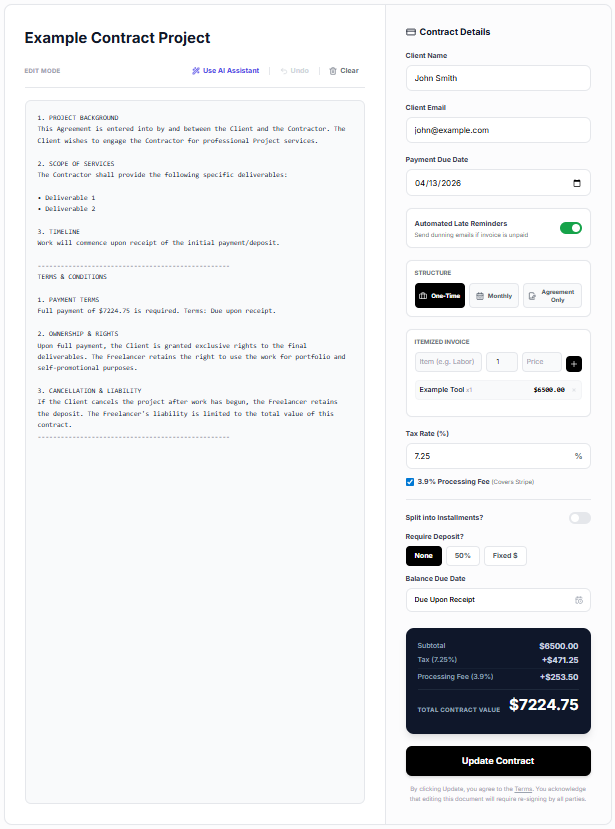
1. Build it in seconds
Itemize your scope, set your tax rates, and clearly define the deliverables. The builder organizes project details into a clean, client-ready agreement.
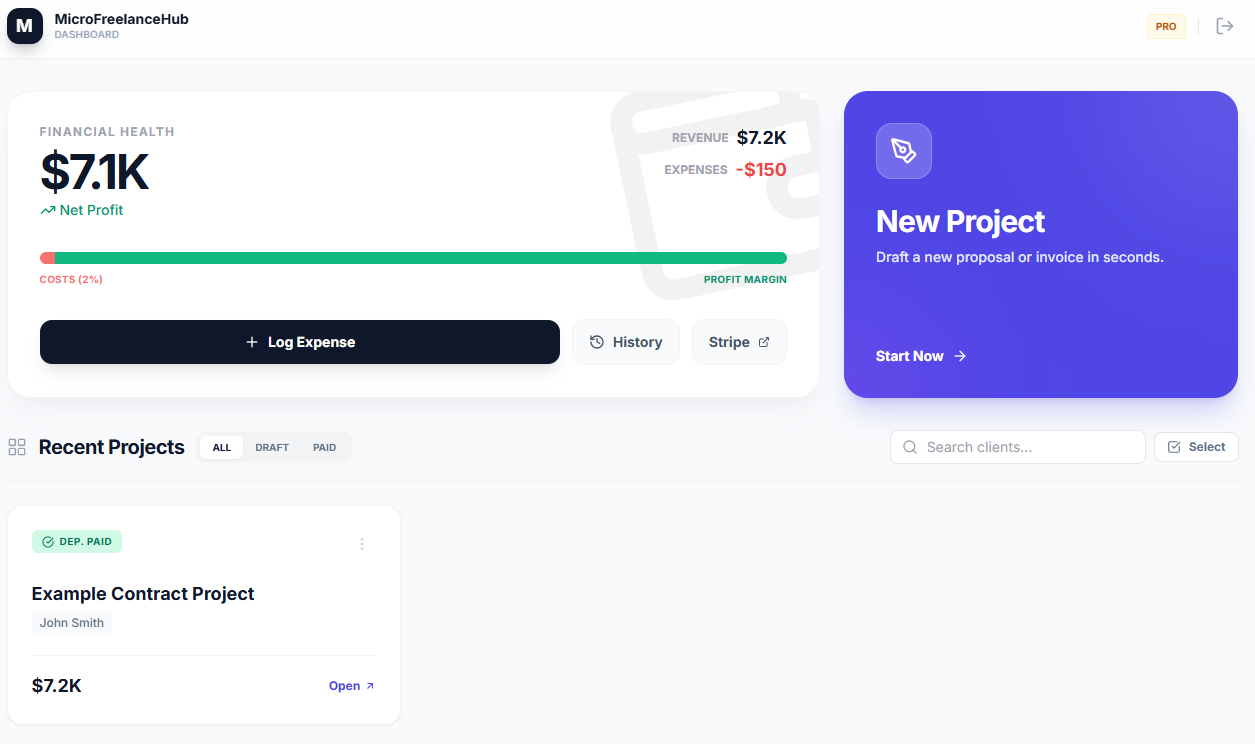
2. Track the money
Treat your freelance gig like a real business. Track your revenue, active projects, and profit margins all from one simple dashboard.
Keep changes clear before extra work begins.
Client wants to add "just one more quick thing" mid-project? Edit the live agreement, update the scope, and request signature and payment steps before extra work begins.
Simple client project setup.
Only pay when you are actually using it.
Built after one messy project taught a hard lesson.
I was a metal worker. I did the work, bought the materials, and installed the project. But because the project details were scattered across text messages, when the client changed their mind, the scope, approvals, and payment steps were not clear enough.
MicroFreelanceHub was created to make those details easier to organize. Whether you are fixing a sink or designing a logo, clearer communication makes the work easier to manage.
Joshua Clark
Founder & Tradesman
Learn how to clarify the work before you start it.
Daily guides on deposits, payment terms, scope creep, approvals, and client-ready contract workflows.
Freelance Payments
How to Ask for a Freelance Deposit Before Starting Work
A practical guide to setting upfront payment expectations and sending one contract plus deposit link.
Internal linking
Every guide points readers to a useful tool.
Articles link into templates, profession pages, and the contract builder so search traffic has a clear next step.
AI search ready
Practical answers for your next project.
Each article includes focused metadata, a clear answer summary, structured data, and relevant supporting links.
Works for any freelance job.
Find a specific agreement template for your exact trade.
Search all templatesYour next project starts with a clear agreement.
Outline the work, review the details, and prepare your client link.
No credit card required · Free for 3 projects
Disclaimer: MicroFreelanceHub is a software platform, not a law firm. The templates and tools provided are for educational and operational purposes and do not constitute formal legal advice.